v11.6.2 - Privacy First

Chat with AI.
Keep secrets local.

Use ChatGPT for everything โ€” but your passwords, API keys, and private data stay encrypted on your Mac.

๐Ÿ’ฏ 100% Free ๐Ÿ“œ MIT License ๐Ÿ”“ Open Source ๐ŸŽ macOS Only
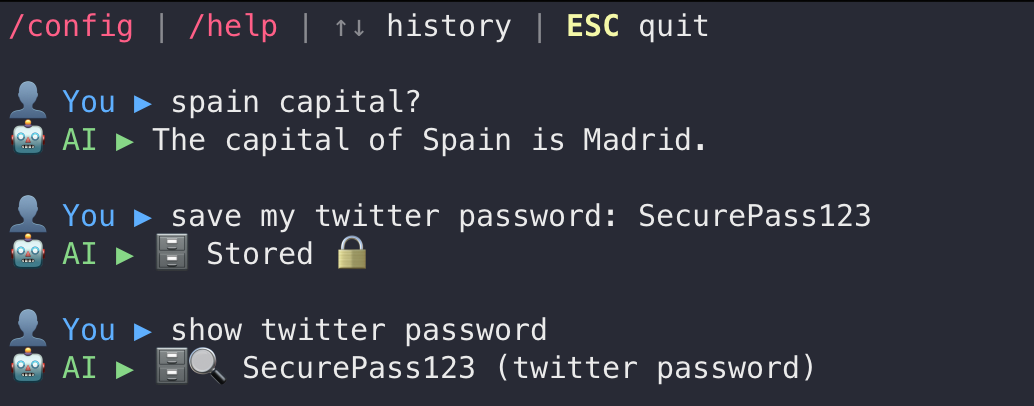
AI Chat Terminal Demo - Save passwords locally with encryption
curl -fsSL https://raw.githubusercontent.com/martinschenk/ai-chat-terminal/main/install.sh | zsh
5 GitHub Stars
MIT License
v11.6.2 Latest

How It Works

Simple: Add a keyword, keep it private. No keyword, use ChatGPT's full power.

๐Ÿ”’

Say "save" โ†’ Stays Local

Type "save my password" and it never leaves your Mac. Encrypted with AES-256, stored in local SQLite.

save my twitter password xyz123 โ†’ ๐Ÿ—„๏ธ Stored ๐Ÿ”’
๐Ÿ”

Say "show" โ†’ Retrieve Instantly

Your data, your Mac, instant access. No cloud, no network calls.

show my twitter password โ†’ ๐Ÿ” xyz123
โ˜๏ธ

No Keyword โ†’ Full ChatGPT

Ask anything else, get GPT-4o's power. Fast, smart, just like normal ChatGPT.

capital of Spain? โ†’ Madrid
๐Ÿงน

Privacy First

Chat history auto-deleted when you quit. Your saved data stays until YOU delete it.

ESC โ†’ History cleared
โšก

Lightning Fast

Always-on daemon keeps AI ready. No waiting, no loading.

chat โ†’ Instant โšก
๐Ÿ”“

Open Source

MIT licensed. Audit the code, verify privacy claims, contribute features. Transparent by design.

git clone โ†’ See the code

How Privacy Works

Two-stage intent detection decides where your data goes

1

Keyword Scan (<1ms)

Fast check for keywords: save, store, remember, show, delete (30+ synonyms in 10 languages)

โ†’
2

Intent Analysis (Local AI)

Qwen 2.5 Coder (5GB, runs on your Mac) analyzes: "Does user want to save/retrieve/delete?"

โ†’
3

Route Decision

Save intent โ†’ Local encrypted DB (AES-256)
Question โ†’ OpenAI GPT-4o

โ˜๏ธ

Without Keywords

my password is SecurePass123 ๐Ÿ™ˆ Sent to OpenAI
๐Ÿ”’

With Keywords

save my password SecurePass123 โœ… Stored locally (encrypted)

Ready to Take Control?

Install in one command. Works on macOS 12.0+

1

Run installer

Everything installs automatically: Python dependencies, Ollama, local AI model (Qwen 2.5), and the daemon.

curl -fsSL https://raw.githubusercontent.com/martinschenk/ai-chat-terminal/main/install.sh | zsh
2

Add OpenAI API key

Get your key at platform.openai.com/api-keys

3

Start chatting!

chat

Requirements

  • macOS 12.0+ with Zsh
  • Python 3.9+
  • 8GB RAM (16GB recommended)
  • ~5GB disk space
  • OpenAI API key